
DigitalCut
IFC → STEP converter · BIM → CAD

A clean STEP model from an IFC file,
ready for CAD.

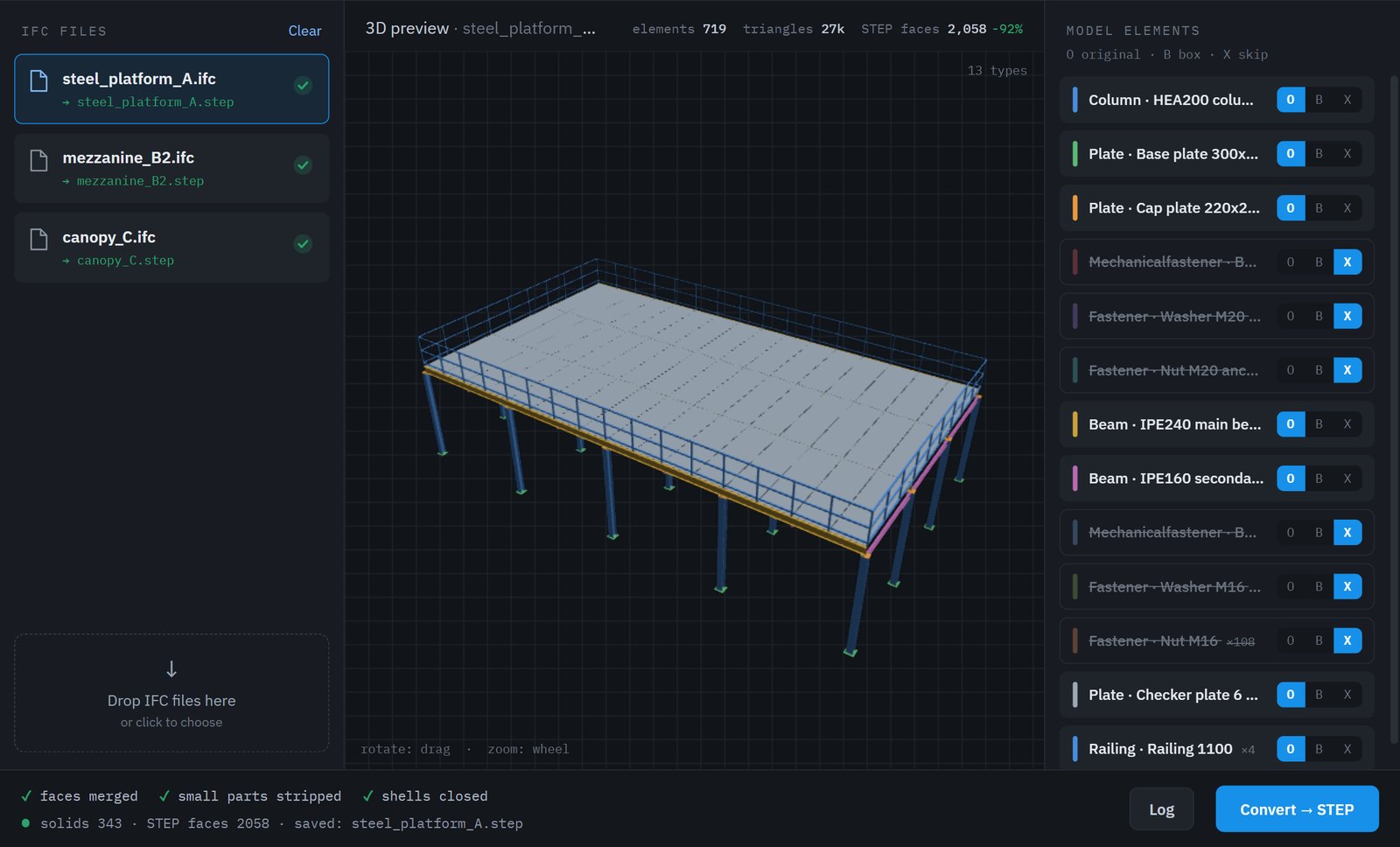
Load an IFC file. The program merges the triangles into smooth faces, strips the small hardware and writes a clean STEP file that opens in any CAD system.

Subscribe · EUR 9.00 / month How it works

Price excl. VAT, added based on your country. Try the program free for 14 days.

Runs locally, your file never leaves your computer
DIGITAL CUT · IFC → STEP OFFLINE
IFC to STEP window: three IFC files converted to STEP, 3D preview of a steel platform and the element list with small parts skipped
What it is for

Stop cleaning up the model instead of drawing

A raw IFC opened straight in CAD is slow to load, draws hundreds of diagonals across flat surfaces (IFC stores solids as triangle meshes) and carries detail you simply do not need on a quotation drawing.

This program does that work for you. It reads the IFC, merges coplanar triangles into a single smooth face, throws out the small hardware and writes a clean STEP file that your CAD opens straight away.

RAW IFC
hundreds of diagonals across a flat wall
AFTER CONVERSION
one smooth face, readable on the drawing
What you get

Everything you need to turn an IFC into a clean CAD model

Smooth surfaces instead of triangle meshes

Opens fast in CAD, split into separate, valid solids

Strips the small hardware automatically: bolts, nuts, washers, anchors

Handles the different ways IFC stores geometry (solids, profiles, IFC4 meshes)

Mesh repair: closes open shells

Batch conversion and drag-and-drop

Windows installer, no extra dependencies

Who it is for

For companies producing quotation and shop drawings in CAD from BIM models. Anywhere you are handed an IFC and need a clean STEP model.

Structural steel Balustrades Façades Metalwork BIM models
How it works

Four steps, from IFC to drawing

01

Load an IFC file, or several at once.

02

Choose your options. The defaults are a good starting point.

03

Click Convert. The STEP file is saved next to the IFC.

04

Open the STEP in your CAD system and draw.

Pricing

One subscription, full access.

Try the program free for 14 days: full model preview, export of the first 20 elements, and once every 48 hours an export of the whole model to check in your CAD. After that it runs on a subscription you can cancel whenever you like.

Requirements: Windows 10 or 11 (64 bit), internet at activation and at least once every 72 hours. Reads IFC files (IFC2x3, IFC4), saves STEP (AP214).

IFC → STEP subscription
EUR 9.00 / month, excl. VAT
excl. VAT, added based on your country
Smooth surfaces instead of triangle meshes
Opens fast in CAD, split into separate, valid solids
Strips the small hardware automatically: bolts, nuts, washers, anchors
Handles the different ways IFC stores geometry (solids, profiles, IFC4 meshes)
Mesh repair: closes open shells
Batch conversion and drag-and-drop
Windows installer, no extra dependencies
Subscribe

Worth knowing: different software, different IFC files

IFC files are exported by dozens of programs (Revit, ArchiCAD, Tekla, Advance Steel, AutoCAD, SketchUp and others) and each one writes geometry slightly differently. The converter handles the common ways of storing a solid, but there is no guarantee that it will read 100% of the elements in every file. Always check the 3D preview and compare the number of solids before you pass the model on.

Model not working? Send it to us

Report a file the converter cannot read

There is no way to test the export from every program that writes IFC. So we treat every file that causes trouble as a bug report. If an element did not load, is missing from the STEP file or looks different from the model, send us that IFC.

We will find out why it does not work. If the cause is on the program side, we will try to fix it in one of the next updates, so with every release the converter handles more files. Not every file can be supported, though, and we do not promise a date for a fix.

1
Send a link to the IFC file
To contact@digitalcut.org. Upload the file to any file sharing service (for example WeTransfer, Google Drive, OneDrive) and paste the link into the e-mail. Please do not attach the file itself.
2
Tell us where it came from
In the same e-mail, give us the program and version it was exported from (for example Tekla 2024), and what is missing in the result.
3
You get an answer
We reply with a diagnosis and tell you whether and when it can be fixed.
Send a link to the IFC file

We will use the file only to diagnose the problem and delete it once the check is finished, at the latest one month after we receive it.

Turn IFC into clean STEP

From EUR 9.00 per month, excluding VAT (added based on your country). Runs locally, nothing is uploaded to a cloud.

Subscribe

We use strictly necessary cookies for signing in and protecting forms. With your consent we also use Google Analytics to see which pages are useful. No ads. You can change your choice at any time in the footer (Cookie settings). Details